Jump straight to the moment
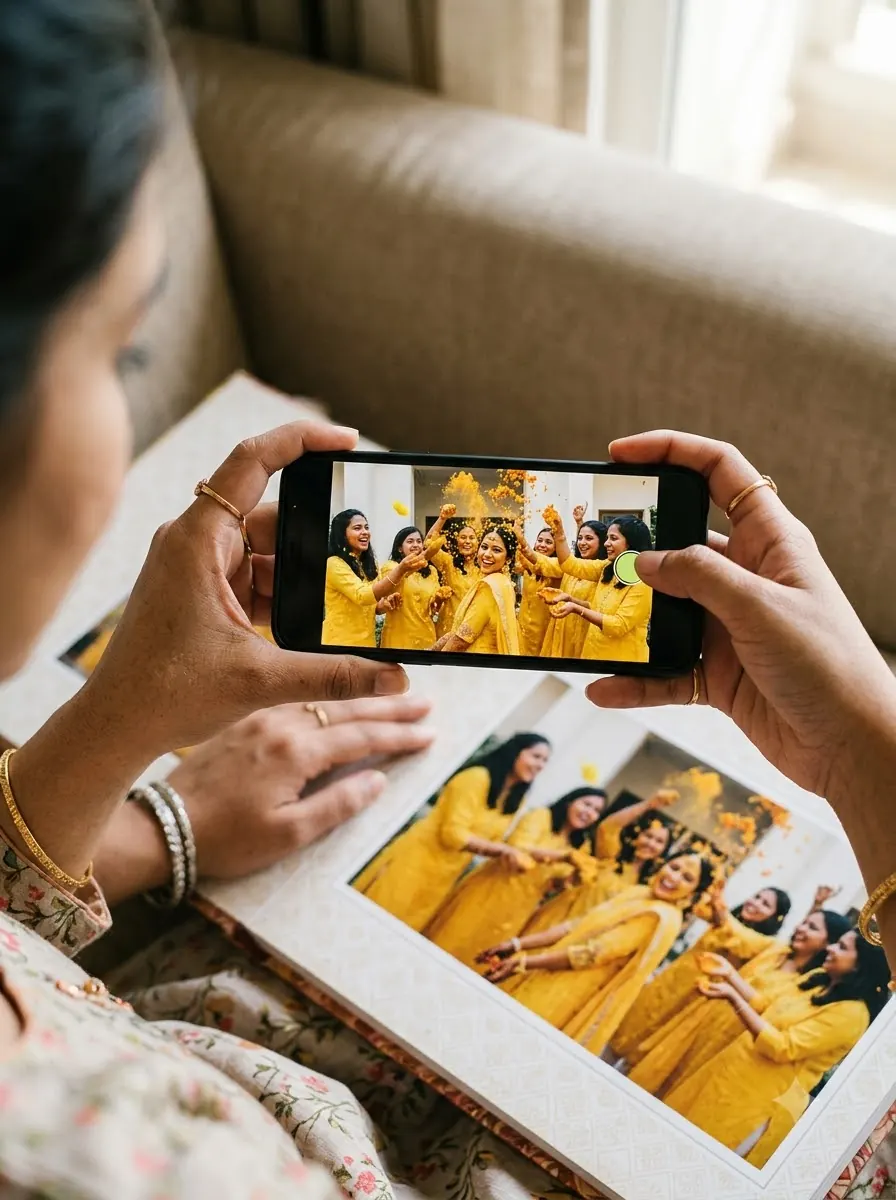
No rewinding or fast-forwarding a two-hour film to find the haldi. Point at the haldi photo and the haldi plays.
Home › AR wedding albums
For wedding photographers
Turn printed album pages into moments couples can relive. They scan the QR on the album, point their phone at a photo, and the clip from your wedding film plays right on the page — in the phone browser, no app.
An AR (augmented reality) wedding album is a printed album whose photos play video when viewed through a phone camera. With PICPOP, guests scan the QR code on the album, the camera opens in the phone’s browser, and the matching clip from the wedding film plays right on top of the photo. One QR code covers the whole album, and there is no app to download.
Why photographers use it
A wedding film is long. An AR album lets families jump to the exact moment they love — and gives couples more than they asked for.
No rewinding or fast-forwarding a two-hour film to find the haldi. Point at the haldi photo and the haldi plays.
Scan once on the cover, then point at any photo in the album. No QR code on every page.
An album where every page plays the moment again — the reaction you’ll want on camera.
Trim clips from the cinematic film. No extra shoot, no extra crew.
Add your studio logo as an image on the video, so your brand plays with the memories.
Grandparents, cousins abroad, friends — anyone with a phone browser can watch.
How it works

1Open it on your phone
 Scan with your phone’s camera
or copy the link
2Point it at your target
Keep this image on screen or print it. When your phone finds it, your objects pop up on top.
Publishing makes the experience live for everyone who scans your target.
↑ Publish project✓ PublishedPut them on albums, posters, packaging or anywhere people will scan.
⤓ Download images⤓ Download QR codeYour workflow
You keep your workflow and your album lab. PICPOP adds the magic in between.
Add the photos you want to bring to life in the PICPOP web editor.
Pick a clip from the wedding film for each photo and add your studio logo.
Publish and download a single QR code that covers every photo in the album.
Place it on the front of the album design.
Print as usual. Couples scan once, then point at any photo and watch.
Moments to bring alive
Pick the photos where the movement matters most — the ones couples wish they could watch again.
Compare
| Pen drive / DVD | QR to a video link | PICPOP AR album | |
|---|---|---|---|
| Find a moment without rewinding | No — scrub through the whole film | No — scrub through the video | Yes — point at the photo |
| Video plays on the photo itself | No | No — opens a separate player | Yes |
| Works straight from the printed album | Needs a computer or TV | Yes | Yes |
| A different clip for each photo | No | Needs one QR per clip | Yes, one clip per photo |
| QR codes needed for the album | — | One per video | Just one for the whole album |
| App needed | — | No | No |
| Your studio logo on the video | If edited in | If edited in | Yes, added as an image |
Pricing
Start with 50 free previews (valid for 20 days), then pay only for the photos you bring to life. Viewing is always free for your guests. All prices inclusive of GST.
Per image · introductory rate
₹129₹199
Studios & bulk
Custom
An AR (augmented reality) wedding album is a printed album whose photos play video when viewed through a phone camera. With PICPOP, guests scan the QR code on the album, the camera opens in the phone browser, and the matching clip from the wedding film plays right on top of the photo.
No. You get one QR code for the whole album. Couples scan it once, the AR camera opens in the browser, and then they can point the phone at any photo in the album to play its moment.
A wedding film runs for an hour or more, so finding one moment means rewinding or fast-forwarding. In an AR album each photo plays its own clip — point at the haldi photo and the haldi plays, point at the pheras and the pheras play.
No. PICPOP is web-based AR. Scanning the QR code on the album opens the AR camera in the phone’s browser, so there is nothing to install.
It works in the web browser of most modern Android phones and iPhones that have a camera. The viewer asks for camera permission the first time.
PICPOP charges per image: ₹129 per image at the introductory rate (regular ₹199), including GST. Each image can have a video of up to 100 MB and stays live for 2 years. You can try it free first, and studios can ask for bulk pricing.
Each image and its video stay live for 2 years from activation. Before that ends, PICPOP reminds you, and you can renew by paying again in the PICPOP web app.
Yes. You can add your studio logo as an image on the video, so your brand appears every time the album is played.
No. You add the QR code to the album cover and print with your usual album lab. The photos themselves are the AR targets.
Yes. PICPOP is web-based, so photographers anywhere in India can use it, and couples and families can watch the album anywhere in the world. PICPOP is made by Alterside Interactive Private Limited in Chennai.
Try it free on one photo. See your couple’s reaction.
Make your first AR album